
Your assistant already knows marketing. It can’t reach MCAE.
Most consultants and marketers on Marketing Cloud Account Engagement are already AI-first everywhere it was easy. Claude or ChatGPT drafts the copy and works through the strategy; Canva AI handles the creative. Then the campaign has to be built, and the assistant that wrote it can’t touch the platform it needs to go into. Someone hand-carries the draft into MCAE, or waits for whoever usually does.
The MCAE Agent closes that gap. It’s an MCP server for MCAE. Connect it to Claude, ChatGPT, Claude Code or any assistant that speaks MCP, and that assistant gains real tools inside your account — lists, prospects, email templates, landing pages, forms, tracked redirects, engagement programs, and the results that come back once something runs. It works through the MCAE API, not a browser, and it never sends anything you didn’t ask it to.
Why not point a browser agent at it?
You can. A general-purpose agent will click through list creation, template selection and program assembly the way a person would. Two things stop that from being a real answer. It’s slow, and it needs watching — browser automation has no idea what a completion action or a suppression list is, so someone sits and checks each click before it reaches a segment or a send. And for most enterprises it never gets that far, because an AI agent holding a live browser session on a system full of customer data is precisely the access a security team refuses.
A working agent needs a whole loop: research what’s already in the account, reason about what to build, run the build, observe what happened. A browser gets it one screen at a time.
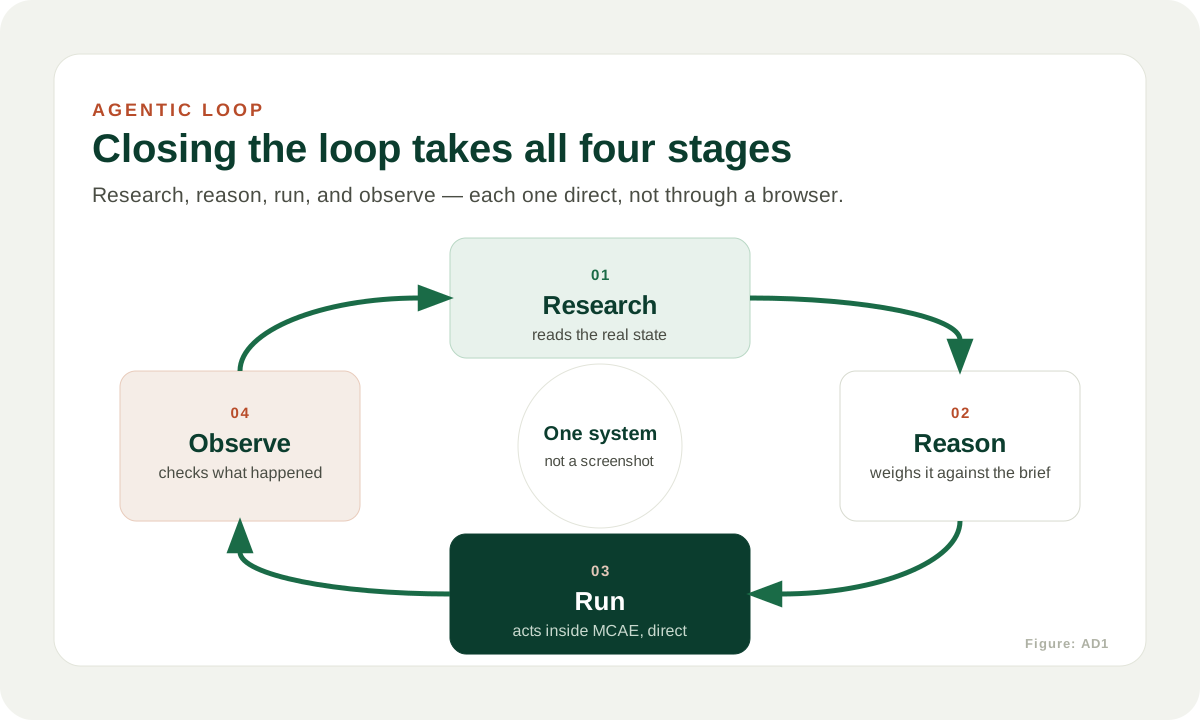
What a campaign looks like
Ask your assistant for “a three-touch re-engagement sequence for trial users who went quiet in the last 90 days, on our standard nurture template.” With the MCAE Agent connected, this is what happens inside MCAE, in the order a specialist would do it:
- It looks at what’s already there — existing lists, the nurture template, past sends to that segment — before building anything.
- It creates the list and the three emails against your template, then the landing page and a tracked redirect for the offer.
- It assembles the engagement program — the waits, the triggers, the exit rules — and leaves it paused.
- You read the real emails, check who is on the real list, and decide. Starting the program is your call, in your words.
- Once it runs, the same assistant reads the results back — opens, clicks, form submissions — so the next brief starts from evidence rather than a guess.
Revisions are plain language too. “Make the second email warmer” or “narrow the list to existing customers” is a complete instruction.
Built to be approved
- It connects as a Salesforce user you authorise, so it can do exactly what that user can do in MCAE and nothing more. Remove the user’s access and the agent’s goes with it.
- There is no browser session and no stored password. Access is the API, under Salesforce OAuth.
- Every action is a named tool call your assistant shows you in the conversation, before it runs and after. Nothing happens off-screen.
- Sending an email and starting a program are separate, explicit calls. The agent will assemble a whole campaign without ever making one; those happen when you say so.
Who it’s for
Marketers on MCAE today who want to build a complete campaign with the assistant they already use, instead of queueing for a specialist or supervising a browser bot.
Consultants and agencies running MCAE for several clients, who need a repeatable, governed way to deliver AI-assisted campaign work — connected per client account, on that client’s own permissions, in a form their security team can sign off.
The mechanics are what it takes off your plate. Strategy, judgement, and the reusable patterns that carry from one campaign to the next stay with you — we wrote about that shift in What “AI-First” Actually Means for Marketers.
Early access
We’re opening the MCAE Agent to a small first cohort. You get it connected to your account with us on the call, a direct line while you use it, and a say in what it does next. What we ask in return is honest evidence: what it built well, and what it got wrong.
Request access at mcae.helikona.com.
Related: What “AI-First” Actually Means for Marketers — the field note on the design behind the MCAE Agent, including the brief–design–build–run loop and why more generation alone would not have closed the queue.